

A one-second delay in page load time can reduce conversions by up to 7%, and for a small business running on tight margins, that loss compounds every single day [2]. Knowing how to speed up a small business website is not a luxury reserved for enterprise IT teams. It is a practical, commercially urgent task that any business owner can begin addressing this week, with or without a technical background.
This guide breaks down the most common causes of slow websites, gives a prioritised fix checklist, and explains when a simple optimisation job is enough versus when a full rebuild makes more commercial sense.
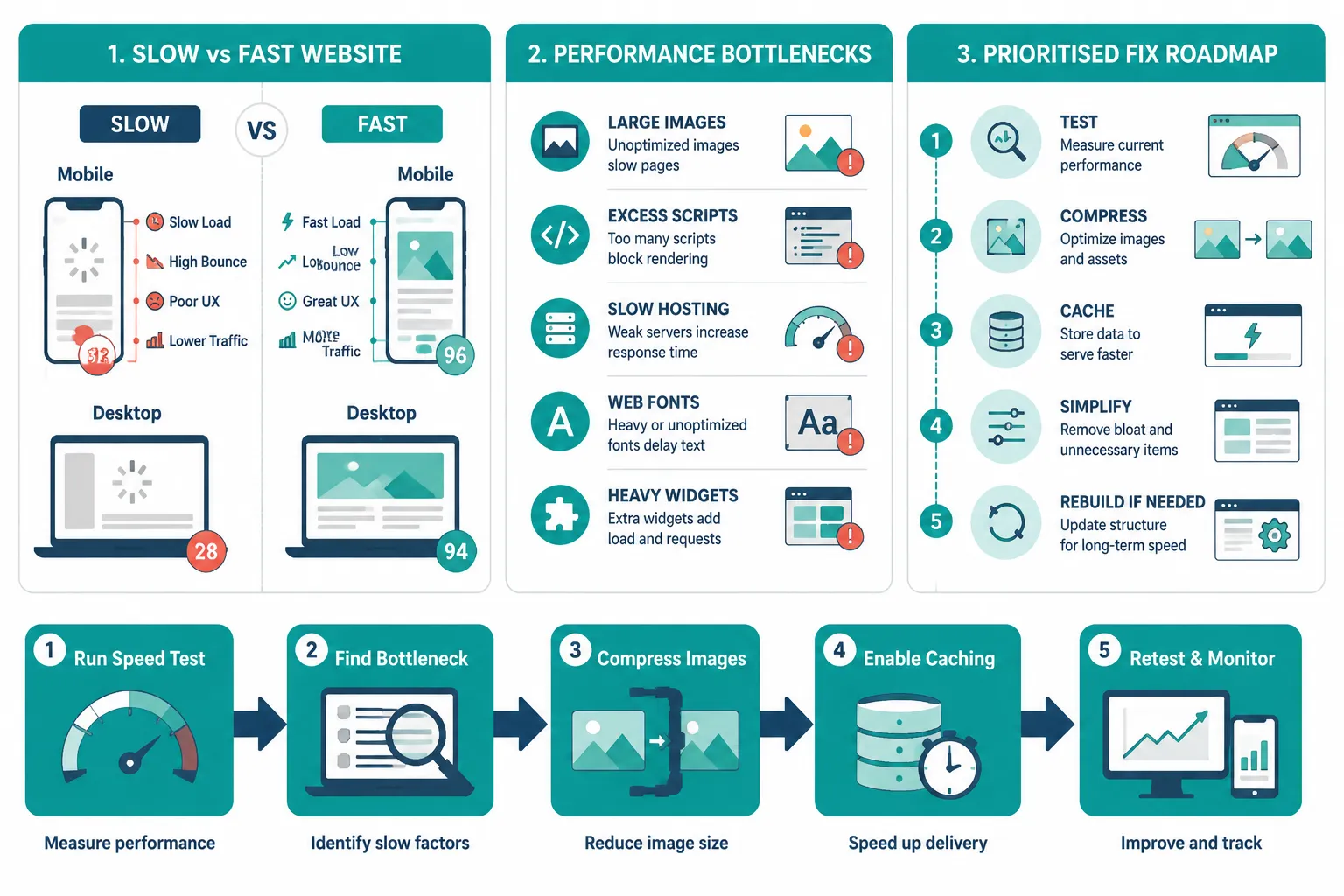
Quick Answer: Slow small business websites are almost always caused by one or more of five problems: oversized images and video, weak hosting with slow server response, too many scripts and plugins loading on every page, poor mobile layout, or missing caching and compression. Fixing the biggest bottleneck first, usually images or hosting, delivers the fastest visible improvement.
Key Takeaways
- Most slow websites have one dominant bottleneck; find it before spending money on fixes
- Image optimisation and caching are the highest-impact, lowest-cost improvements available
- Google’s Core Web Vitals directly affect search rankings, making speed an SEO issue as well as a user experience issue
- Mobile performance must be treated as the primary target, not an afterthought
- A full rebuild is only warranted when the existing site’s structure cannot support the fixes needed
Table of Contents
- Why Website Speed Matters for Small Businesses
- How to Test Your Website Speed on Mobile and Desktop
- Common Cause 1: Oversized Images and Heavy Media
- Common Cause 2: Weak Hosting and Slow Server Response
- Common Cause 3: Too Many Scripts, Plugins, Fonts and Widgets
- Common Cause 4: Poor Mobile Performance
- Common Cause 5: Missing Caching, Compression and Modern File Formats
- The Practical Speed Fix Checklist: What to Fix First
- When a Simple Optimisation Job Is Enough
- When a Full Rebuild Makes More Sense
- What to Prepare Before Hiring a Website Performance Specialist
- How Speed Connects to Enquiries, SEO and Customer Trust
- FAQ
- Conclusion: Fix the Biggest Bottleneck First
Why Website Speed Matters for Small Businesses
A local plumber once had a beautifully designed website, professional photos, clear service areas, a contact form. Enquiries were almost nonexistent. A technical audit revealed the homepage took 11 seconds to load on a mobile connection. Most visitors had left before the page even finished rendering.
This scenario plays out across thousands of small business websites every day. Speed is not just a technical metric. It is the first impression a visitor receives, and it directly shapes whether they stay or leave.
Google’s Core Web Vitals, a set of real-world performance measurements, are now a confirmed ranking signal [10]. The three primary metrics are:
| Metric | What It Measures | Good Threshold |
|---|---|---|
| LCP (Largest Contentful Paint) | How fast the main content loads | Under 2.5 seconds |
| INP (Interaction to Next Paint) | How quickly the page responds to clicks | Under 200 milliseconds |
| CLS (Cumulative Layout Shift) | How stable the layout is while loading | Under 0.1 |
In 2026, Google has placed increased diagnostic emphasis on INP and TTFB (Time to First Byte), making server response speed a more prominent factor in technical SEO assessments [1][7]. A site that scores poorly on these metrics is likely to rank lower than a competitor whose site performs well, even if the content quality is comparable.
Beyond rankings, slow sites erode trust. Visitors associate a slow, unstable page with an unreliable business, regardless of how good the underlying service actually is.
How to Test Your Website Speed on Mobile and Desktop
Before fixing anything, measure what is actually broken. Guessing wastes time and money.
Recommended free tools:
- Google PageSpeed Insights (pagespeed.web.dev), provides Core Web Vitals data for both mobile and desktop, with specific fix recommendations
- GTmetrix, shows waterfall charts that identify which files are causing delays
- Google Search Console, the Core Web Vitals report shows real-user data from visitors to the site
Run the test on mobile first. Google uses mobile-first indexing, meaning the mobile version of a site is what determines search rankings [8]. A site that loads quickly on a desktop but slowly on a phone is still a slow site in Google’s view.
Record the baseline scores before making any changes. This creates a reference point for measuring whether fixes are working.
Common Cause 1: Oversized Images and Heavy Media
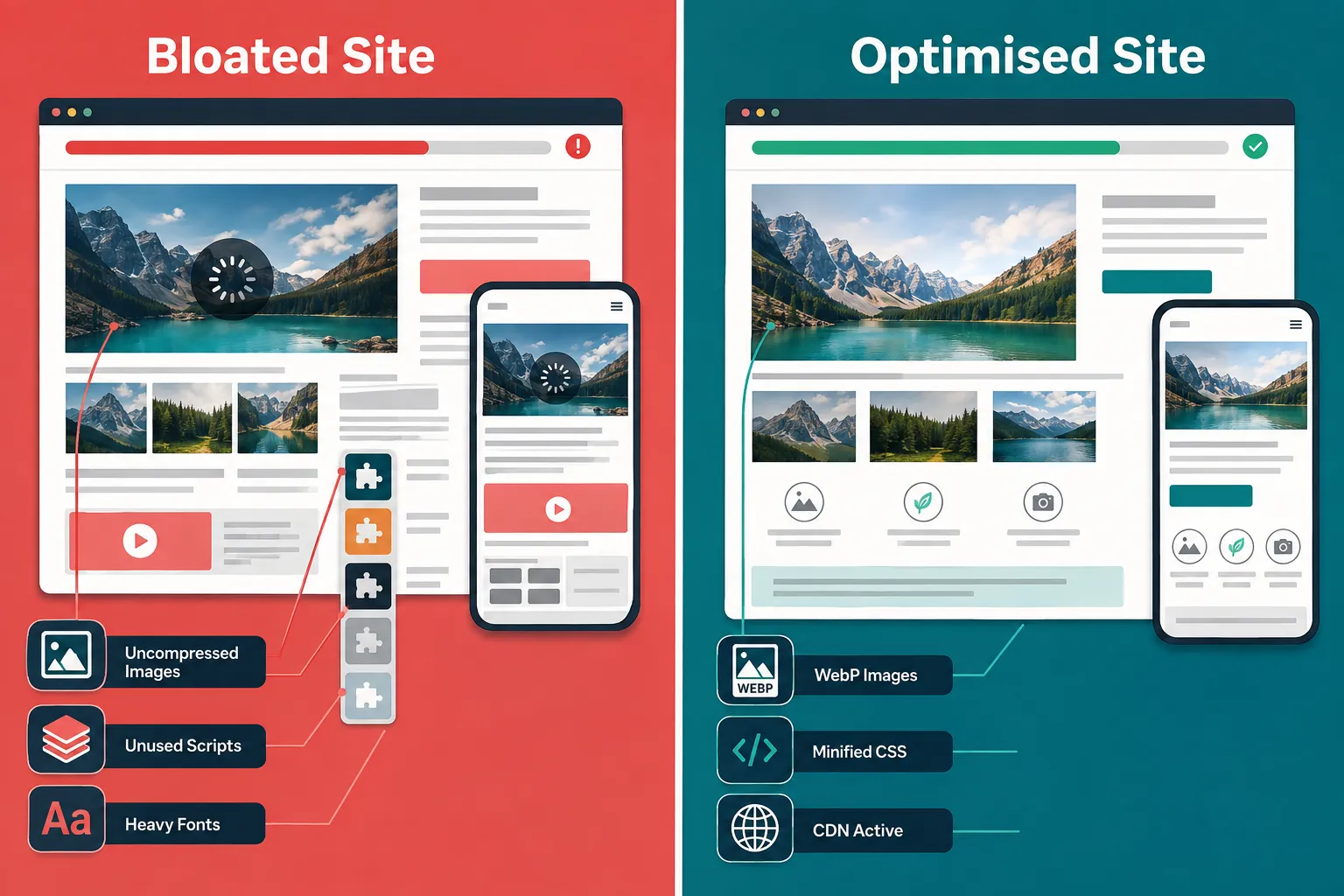
Images are the single most common cause of slow small business websites [5]. A photographer’s portfolio, a restaurant menu with food photography, or a tradesperson’s before-and-after gallery can easily add several megabytes of data to a single page, data that must download before the page feels usable.
The core problems:
- Images uploaded directly from a smartphone or camera are often 3-8 MB each
- JPEG and PNG files are larger than modern alternatives
- Images are not resized to match the display dimensions on screen
- Videos are embedded from the server rather than hosted on a streaming platform
What good looks like in 2026:
- Convert images to WebP format, which delivers comparable quality at 25-35% smaller file sizes [6]
- Resize images to the maximum display width they will ever appear at (typically 1200px for full-width images)
- Enable lazy loading so images below the fold only download when the visitor scrolls to them
- Host video on YouTube or Vimeo and embed it, rather than uploading video files directly to the website server
For WordPress sites specifically, plugins such as ShortPixel or Smush can automate compression on upload. For non-WordPress sites, a web developer or design/development specialist can configure server-side image processing.
Common Cause 2: Weak Hosting and Slow Server Response
Hosting is the foundation everything else sits on. A well-optimised website on poor hosting will still load slowly. TTFB, the time it takes for the server to begin responding after a browser makes a request, is a direct reflection of hosting quality [7].
Signs of a hosting problem:
- TTFB above 600 milliseconds consistently
- The site slows down noticeably during business hours
- The hosting plan is shared with thousands of other websites (common on cheap shared hosting)
- The server is located in a different country from the majority of the site’s visitors
What to look for in better hosting:
- Managed WordPress hosting (if using WordPress) from providers with built-in performance layers
- VPS (Virtual Private Server) hosting for sites with moderate traffic
- Servers located in or near the geographic region of the target audience
- Support for HTTP/2 or HTTP/3 protocols, which load multiple files simultaneously rather than one at a time [8]
Upgrading hosting is one of the most impactful single changes available, but it should come after image optimisation and caching have been addressed. Fixing the cheapest problems first is the recommended approach before committing to higher monthly hosting costs [2].
Common Cause 3: Too Many Scripts, Plugins, Fonts and Widgets
Every third-party element added to a website, a chat widget, a social media feed, a cookie consent tool, an analytics script, a custom font, adds an HTTP request and additional data that must load before the page is fully usable.
A small business website that has been built incrementally over several years often accumulates a significant amount of this technical debt without anyone noticing, because each individual addition seemed minor at the time.
Common offenders:
- Unused or redundant plugins (particularly on WordPress sites)
- Multiple Google Fonts families loaded across the site
- Social media feed embeds that pull live data on every page load
- Tag manager containers with outdated or duplicate tracking scripts
- Full-page slider or carousel plugins that load large JavaScript libraries
Practical fixes:
- Audit every plugin and remove anything not actively used
- Limit web fonts to one or two families; use system fonts where possible
- Replace live social media feeds with static screenshots updated manually
- Consolidate tracking through a single tag manager and remove duplicate scripts
- Minify CSS and JavaScript, a process that strips unnecessary whitespace and comments from code files, reducing their size [4]
Common Cause 4: Poor Mobile Performance
Google’s mobile-first indexing means that mobile performance is not a secondary concern, it is the primary one [10]. Yet many small business websites were built with desktop layouts in mind and then adapted for mobile as an afterthought, resulting in layouts that technically display on a phone but perform badly.
Specific mobile performance problems:
- Large desktop images served to mobile devices with no resizing
- Touch targets (buttons, links) too small or too close together, causing accidental taps
- Text that requires horizontal scrolling or zooming to read
- Layout shifts during loading (high CLS score) that cause buttons to jump as the visitor tries to tap them
- Render-blocking scripts that delay the appearance of any content on screen
Fixes to prioritise:
- Use responsive images with
srcsetattributes so smaller image files are sent to mobile devices - Ensure all tap targets are at least 48×48 pixels
- Eliminate render-blocking resources by deferring non-critical JavaScript
- Test the site on real mobile devices, not just browser emulators
For businesses that rely on local search traffic, tradespeople, restaurants, clinics, retailers, mobile performance is especially critical, as the majority of local searches happen on smartphones.
Common Cause 5: Missing Caching, Compression and Modern File Formats
Caching and compression are two of the most impactful and underused performance tools available to small business websites.
Browser caching tells a visitor’s browser to store certain files locally after the first visit, so on subsequent visits those files do not need to be downloaded again. Without caching headers configured correctly, every page visit downloads every file from scratch [6].
GZIP or Brotli compression reduces the size of HTML, CSS and JavaScript files before they are sent from the server to the browser, typically achieving 60-80% size reduction on text-based files [3].
Modern file formats extend beyond images. Serving JavaScript in modern module formats and using efficient CSS delivery methods can meaningfully reduce the total data transferred on each page load.
Quick checklist for this category:
- Confirm GZIP or Brotli compression is enabled (PageSpeed Insights will flag this if not)
- Set browser cache expiry headers for static assets (images, CSS, JS) to at least 30 days
- Implement a Content Delivery Network (CDN) to serve files from servers geographically close to each visitor [7]
- Use WebP for images (covered above) and AVIF where browser support allows
The Practical Speed Fix Checklist: What to Fix First
Work through this checklist in order. Each item is ranked by impact relative to effort.
Priority 1, Highest impact, lowest cost:
- Run PageSpeed Insights and record baseline scores
- Compress and convert all images to WebP
- Enable lazy loading for images
- Enable GZIP/Brotli compression on the server
- Set browser cache headers for static files
- Remove unused plugins and scripts
Priority 2, Medium impact, low-to-medium cost:
- Minify CSS and JavaScript files
- Reduce or consolidate web fonts
- Defer non-critical JavaScript
- Implement a CDN
Priority 3, Higher cost, significant impact:
- Upgrade hosting to a faster plan or provider
- Rebuild pages with render-blocking resource issues
- Implement server-side image processing
For WordPress sites, the guide on fixing a slow WordPress site and recovering lost sales covers platform-specific implementation in greater detail.
When a Simple Optimisation Job Is Enough
Most small business websites do not need to be rebuilt to perform well. Optimisation is the right choice when:
- The site’s structure and navigation are sound
- The content is current and well-organised
- The primary issues are images, caching, scripts or hosting
- The site was built within the last three to four years on a modern platform
In these cases, a website performance specialist can typically resolve the most significant bottlenecks within a few focused sessions. The return on that investment is measurable: faster load times, improved Core Web Vitals scores, and, in most cases, a meaningful increase in the percentage of visitors who stay long enough to enquire.
If the business also needs support with broader technical infrastructure, the small business tech support guide covers the wider landscape of technical help available to non-technical operators.
When a Full Rebuild Makes More Sense
A rebuild is worth considering when optimisation alone cannot solve the underlying problems. Indicators that a rebuild is the better investment include:
- The site was built on an outdated platform or a discontinued theme with no active support
- The codebase is so heavily customised that standard performance tools cannot be applied
- The site fails Core Web Vitals on every page, not just a few
- Mobile layout issues are structural, not cosmetic
- The business has grown significantly and the site’s information architecture no longer reflects what the business offers
A rebuild should be treated as a business investment with a measurable return, not just a design refresh. Understanding the return on investment from website and marketing decisions helps frame the decision correctly.
What to Prepare Before Hiring a Website Performance Specialist
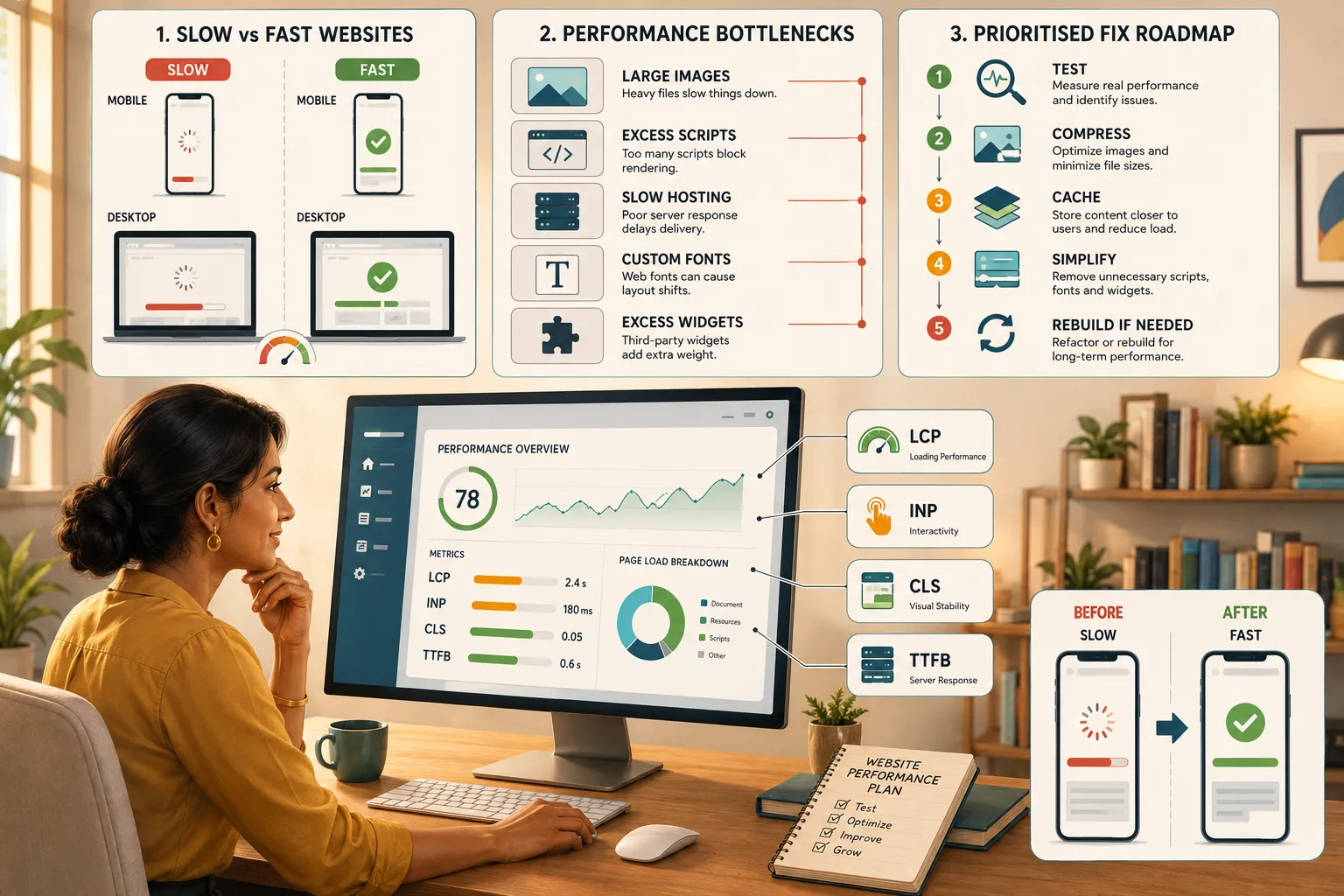
Coming to a performance specialist with the right information saves time and reduces costs. Prepare the following before the first conversation:
- PageSpeed Insights report for the homepage and one or two key service pages
- Google Search Console Core Web Vitals report (if the site has been live for more than a few months)
- Current hosting details, provider name, plan type, and server location
- List of active plugins or third-party integrations (chat tools, booking systems, analytics, CRM connections)
- Monthly visitor numbers and the pages that receive the most traffic
- The primary goal, is the priority faster load times, better mobile scores, improved rankings, or all three?
With this information, a technical SEO specialist or web developer can provide a focused assessment rather than spending billable time on discovery that the business owner could have prepared in advance.
If the project is likely to grow into broader digital work, including automation or custom tooling, the non-technical founder’s guide to custom app development provides useful context on scoping technical projects without a technical background.
How Speed Connects to Enquiries, SEO and Customer Trust
Website speed does not exist in isolation. It connects directly to three commercial outcomes that matter to every small business.
Search rankings: Google uses Core Web Vitals as a ranking signal. A site that consistently fails LCP, INP or CLS thresholds is at a structural disadvantage in search results compared to competitors whose sites pass [10][1]. For businesses that rely on organic search for new enquiries, this is a direct revenue issue.
Enquiry rates: Visitors who experience a slow, unstable page are less likely to complete a contact form, make a booking, or call. The relationship between speed and conversion is well-documented, faster pages convert at higher rates [2]. This is the same commercial logic explored in detail in the context of brand identity for small business: every touchpoint either builds or erodes confidence.
Customer trust: A slow website signals, fairly or not, that the business behind it is not attentive to detail. For service businesses where trust is the primary purchase driver, this perception cost is real and ongoing.
Businesses expanding their digital presence into multilingual markets should also be aware that website translation performance considerations add additional complexity to speed optimisation, particularly when serving content across different regions.
FAQ
How long does it take to fix a slow small business website?
Most high-priority fixes, image compression, caching, script cleanup, can be completed within one to two weeks by a competent web developer or performance specialist. More complex issues, such as hosting migration or structural rebuilds, typically take two to six weeks depending on site complexity.
Will fixing website speed actually improve my Google rankings?
Yes, in most cases. Core Web Vitals are a confirmed Google ranking signal. Improving LCP, INP and CLS scores removes a performance penalty that may be suppressing rankings. The improvement is most noticeable in competitive local search results where multiple businesses have comparable content quality [10][7].
Do I need to rebuild my website to make it faster?
Not usually. The majority of slow small business websites can be significantly improved through optimisation alone, image compression, caching, script reduction and hosting upgrades. A rebuild is only warranted when the site’s underlying structure prevents these fixes from being applied effectively.
What is a good page load time target for a small business website?
Aim for LCP under 2.5 seconds on mobile, measured by Google PageSpeed Insights. A TTFB under 600 milliseconds and an INP under 200 milliseconds are the supporting targets that indicate the server and interactivity are also performing well [1][4].
How much does website speed optimisation cost?
Cost varies significantly depending on the scope of work, the platform the site is built on, and the severity of the issues. Targeted optimisation work, images, caching, script cleanup, is generally a contained engagement. A full performance audit with implementation typically costs more than a single-issue fix. Getting a PageSpeed Insights report first helps any specialist give a more accurate estimate.
How often should a small business check its website speed?
A monthly check using PageSpeed Insights is a reasonable routine. A more thorough review using Google Search Console’s Core Web Vitals report is recommended quarterly, or after any significant change to the site such as a new plugin, theme update, or content addition [2].
Conclusion: Fix the Biggest Bottleneck First
Knowing how to speed up a small business website does not require a computer science degree. It requires a methodical approach: measure first, identify the dominant bottleneck, fix the highest-impact problems in order of cost and effort, then retest.
For the vast majority of small business websites, the path to a meaningfully faster site runs through image optimisation, caching, script reduction and, if those fixes are not enough, a hosting upgrade. A full rebuild is occasionally the right answer, but it is rarely the first answer.
Actionable next steps:
- Run a free PageSpeed Insights test on the homepage today and record the scores
- Check whether images are compressed and in WebP format
- Confirm GZIP compression and browser caching are active on the server
- Remove any plugins, scripts or widgets that are not actively contributing to the site’s purpose
- If the scores remain poor after these steps, consult a website performance specialist with the diagnostic data already in hand
A faster website is not just a technical achievement. It is a commercial asset that works every hour the business is open, and every hour it is not.
.cg-cwv-wrap{font-family:sans-serif;max-width:560px;margin:2rem auto;background:#f8fafc;border:1px solid #cbd5e1;border-radius:10px;padding:1.5rem}
.cg-cwv-wrap h3{margin:0 0 .75rem;color:#1e3a5f;font-size:1.1rem}
.cg-cwv-wrap label{display:block;margin:.6rem 0 .2rem;font-size:.85rem;color:#334155;font-weight:600}
.cg-cwv-wrap input{width:100%;box-sizing:border-box;padding:.45rem .6rem;border:1px solid #94a3b8;border-radius:6px;font-size:.95rem}
.cg-cwv-btn{margin-top:1rem;background:#0f6fad;color:#fff;border:none;padding:.55rem 1.2rem;border-radius:6px;cursor:pointer;font-size:.95rem;width:100%}
.cg-cwv-btn:hover{background:#0c5a8e}
.cg-cwv-result{margin-top:1rem;display:none}
.cg-cwv-row{display:flex;justify-content:space-between;align-items:center;padding:.4rem .6rem;border-radius:6px;margin:.3rem 0;font-size:.88rem}
.cg-pass{background:#dcfce7;color:#166534}
.cg-fail{background:#fee2e2;color:#991b1b}
.cg-cwv-note{font-size:.78rem;color:#64748b;margin-top:.75rem}
Core Web Vitals Quick Checker
Enter your scores from Google PageSpeed Insights to see if you pass Google’s 2026 thresholds.
Thresholds: LCP < 2.5s | INP < 200ms | CLS < 0.1. Source: Google Core Web Vitals (developers.google.com).
function cgCheck(){
var lcp=parseFloat(document.getElementById(‘cg-lcp’).value);
var inp=parseFloat(document.getElementById(‘cg-inp’).value);
var cls=parseFloat(document.getElementById(‘cg-cls’).value);
if(isNaN(lcp)||isNaN(inp)||isNaN(cls)){alert(‘Please enter all three scores.’);return;}
function setRow(id,label,pass,val,unit){
var el=document.getElementById(id);
el.className=’cg-cwv-row ‘+(pass?’cg-pass’:’cg-fail’);
el.textContent=label+’: ‘+val+unit+’, ‘+(pass?’PASS’:’NEEDS WORK’);
}
setRow(‘cg-lcp-r’,’LCP’,lcp<2.5,lcp,’s’);
setRow(‘cg-inp-r’,’INP’,inp<200,inp,’ms’);
setRow(‘cg-cls-r’,’CLS’,cls<0.1,cls,”);
document.getElementById(‘cg-res’).style.display=’block’;
}
References
[1] Google Core Web Vitals Update 2026 – https://webvitals.tools/blog/google-core-web-vitals-update-2026/
[2] Website Speed Optimization Small Business Conversion Playbook 2026 – https://myaiprotools.com/blog/website-speed-optimization-small-business-conversion-playbook-2026
[3] How To Improve Website Speed – https://www.milesmarketing.co.uk/how-to-improve-website-speed/
[4] Ultimate Checklist – https://www.corewebvitals.io/core-web-vitals/ultimate-checklist
[5] Best Page Speed Fixes Small Business 2026 – https://yourwebteam.io/best-page-speed-fixes-small-business-2026/
[6] Improve Your Site Speed 17 Step Complete Guide 2026 – https://shankom.com/improve-your-site-speed-17-step-complete-guide-2026/
[7] Core Web Vitals 2026 Technical Seo Guide – https://almcorp.com/blog/core-web-vitals-2026-technical-seo-guide/
[8] Seo Technical Foundations Guide 2026 – https://www.involvedigital.com/insights/seo-technical-foundations-guide-2026
[10] Core Web Vitals – https://developers.google.com/search/docs/appearance/core-web-vitals