
Sixty-three percent of small businesses in the United States now use generative AI tools as part of their regular operations, a figure that would have seemed implausible just three years ago [3]. That number is not a projection or an aspiration. It is the reality of 2026, and it is reshaping what it means to run a lean, competitive business. For owners who have not yet adopted small business AI automation, the gap between them and their AI-enabled competitors is widening every quarter.
This guide breaks down exactly what small business AI automation is, which processes it transforms most effectively, how to implement it without a technical background, and what pitfalls to avoid. Whether a business owner is running a two-person consultancy or a 50-employee retail operation, the frameworks here apply.
Key Takeaways
- More than half of small and medium-sized businesses now use generative AI, with adoption accelerating sharply in 2025 and 2026 [6]
- AI automation delivers the highest ROI in repetitive, time-intensive tasks: customer service, invoicing, scheduling, and marketing content
- Successful implementation does not require a dedicated IT team or a large budget, many tools cost less than a monthly phone bill
- Generative AI has moved from an experimental add-on to a core component of SMB IT strategy and budgets [2]
- The biggest barrier to adoption is not cost or complexity, it is a lack of a clear starting point

Why Small Business AI Automation Is No Longer Optional
For most of the last decade, AI was a technology reserved for enterprises with dedicated data science teams and seven-figure software budgets. That era is over. The democratization of AI tools, particularly large language models and generative AI platforms, has put enterprise-grade automation within reach of a sole proprietor with a laptop and a credit card.
According to research from Techaisle, generative AI has become “critical” to SMB strategy and is now embedded in core IT budgets rather than treated as a discretionary experiment [2]. This is a meaningful shift. When a technology moves from the “nice to have” column to the “core infrastructure” column, it signals that businesses which ignore it are not just missing an opportunity, they are accumulating a competitive disadvantage.
The Cost of Doing Nothing
The argument for staying manual is usually framed around risk: “What if the AI makes mistakes?” or “What if my customers don’t like it?” These are legitimate concerns, but they ignore the cost of the status quo.
Consider a small business owner who spends 12 hours per week on administrative tasks, answering routine emails, scheduling appointments, generating invoices, posting to social media. At a conservative value of $75 per hour for an owner’s time, that is $900 per week, or roughly $46,800 per year, spent on work that AI tools can handle for under $200 per month.
The math is not subtle.
Beyond time savings, there is the question of consistency and scale. A human employee can handle a certain volume of customer inquiries per day. An AI-powered customer service tool can handle thousands simultaneously, at 3 a.m. on a Sunday, without overtime pay.
“The businesses that thrive in the next five years will not be the ones that adopted AI the fastest, they will be the ones that integrated it most thoughtfully into their existing workflows.”
What the Data Says About SMB Adoption
The adoption curve for small business AI automation has steepened dramatically. As of 2026, 58% of small and medium-sized businesses are actively using generative AI tools [6]. That figure represents a majority, meaning the typical small business owner’s competitors are already using these tools [3].
Adoption is not uniform across industries. Businesses in professional services, e-commerce, marketing, and healthcare administration have led the way. Trades and construction businesses have been slower to adopt, though AI tools for scheduling, quoting, and customer communication are gaining traction in those sectors as well [1].
The Core Areas Where AI Automation Delivers Real Results
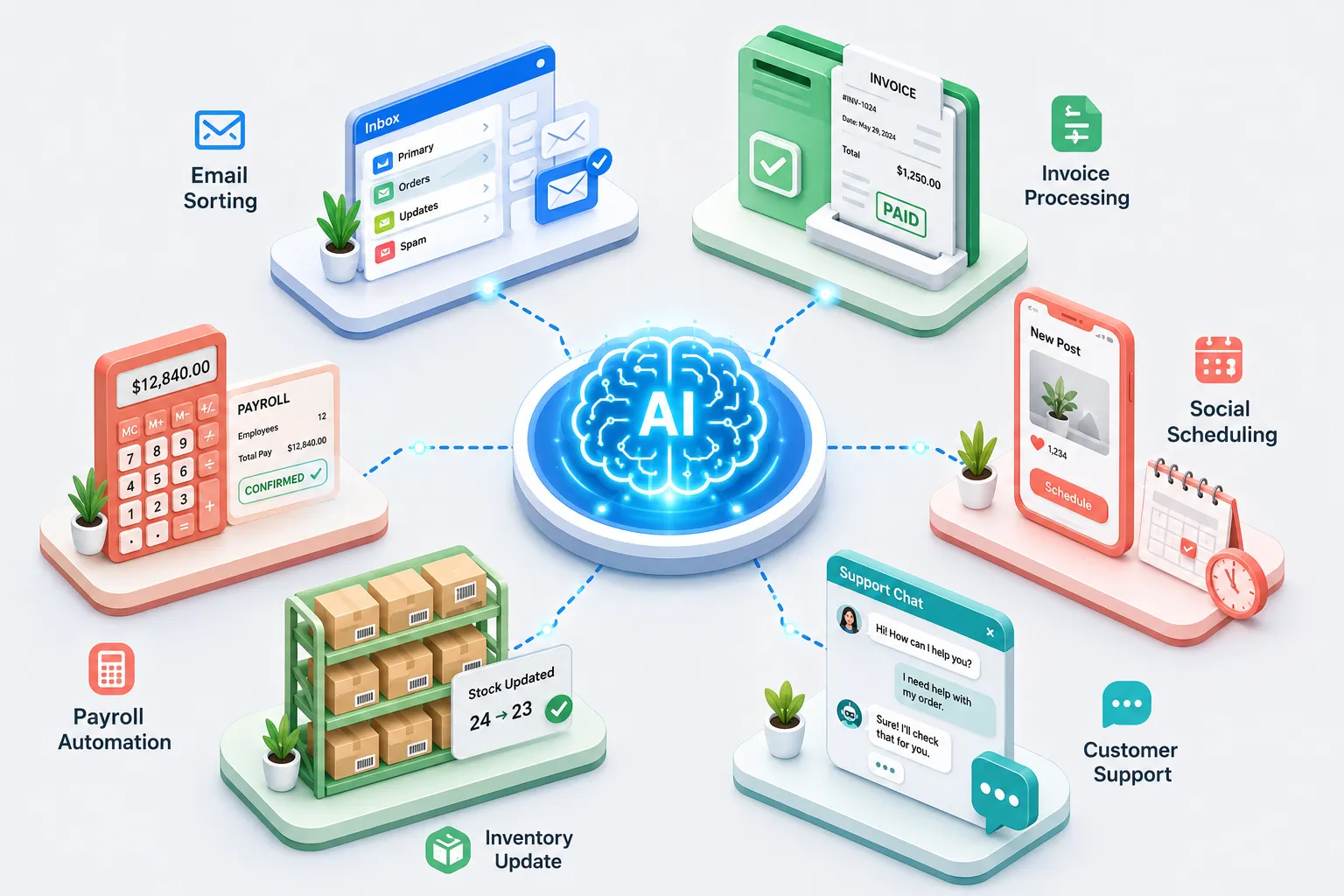
Not all automation is created equal. The highest-impact applications of small business AI automation tend to cluster around a handful of operational areas where the work is repetitive, rule-based, and time-consuming. These are the areas worth targeting first.

Customer Service and Communication
Customer service is the single most common entry point for small business AI automation, and for good reason. A large portion of customer inquiries are variations of the same questions: “What are your hours?” “Where is my order?” “Can I reschedule my appointment?” These questions do not require human judgment, they require accurate, fast responses.
AI chatbots and virtual assistants can handle this tier of communication around the clock.
For a complete step-by-step walkthrough, see our guide on How to Build and Deploy a Custom ChatGPT for Business.
Tools like Tidio, Intercom’s AI features, and purpose-built GPT-powered assistants can be trained on a business’s specific products, policies, and FAQs within hours [7].
Key benefits in this area:
- 24/7 availability without staffing costs
- Consistent, on-brand responses every time
- Automatic escalation to a human when the query is complex
- Reduction in response time from hours to seconds
For businesses that rely heavily on repeat customers, salons, restaurants, service providers, AI-powered follow-up sequences can also automate review requests, appointment reminders, and loyalty program communications.
Marketing and Content Creation
Content marketing is one of the most resource-intensive tasks for small businesses. Writing blog posts, drafting email newsletters, creating social media captions, and designing ad copy all require skill, time, and creative energy. Generative AI tools have transformed this landscape entirely.
Platforms like Jasper, Copy.ai, and the built-in AI features in tools like Canva and HubSpot allow small business owners to produce a week’s worth of social media content in under an hour [7]. More importantly, these tools can be prompted to match a specific brand voice, target a specific audience, and optimize for specific platforms.
A practical content automation workflow for a small business might look like this:
- Input a product or service description into an AI writing tool
- Generate five social media post variations in different tones
- Use an AI image tool to create matching visuals
- Schedule all posts through a tool like Buffer or Later
- Repeat weekly in 45 minutes or less
This workflow replaces what would otherwise require either a part-time social media manager or 6-8 hours of an owner’s time per week.
Financial Operations and Invoicing
Accounts receivable is a perennial pain point for small businesses. Late invoices, missed follow-ups, and manual data entry create cash flow problems that can threaten the viability of otherwise healthy businesses.
AI-powered accounting tools, including QuickBooks AI features, FreshBooks, and newer platforms like Dext, can automate invoice generation, payment reminders, expense categorization, and even basic financial forecasting [9].
For a complete step-by-step walkthrough, see our guide on 15 Proven Ways to Automate the Repetitive Tasks Eating Your Workday.
Some tools can read receipts via a smartphone camera and automatically categorize the expense, eliminating manual data entry entirely.
The downstream effect is significant: businesses that automate their invoicing and follow-up processes report getting paid faster, with less friction, and with fewer disputes, because the documentation is more consistent and complete [1].
Scheduling and Appointment Management
For service-based businesses, consultants, therapists, contractors, healthcare providers, scheduling is a constant administrative burden. Phone tag, double-bookings, and no-shows are expensive in both time and revenue.
AI scheduling tools like Calendly (with its AI features), Acuity Scheduling, and newer entrants can handle the entire booking workflow: finding available times, sending confirmations, processing deposits, sending reminders, and rescheduling when needed. Some tools integrate directly with Google Calendar, Outlook, and practice management software.
The no-show rate reduction alone can justify the cost of these tools. Research suggests that automated appointment reminders reduce no-shows by 20-30%, which for a service business with a $150 average appointment value translates to meaningful recovered revenue [9].
How to Implement Small Business AI Automation Without Overwhelm
The most common reason small business owners delay AI adoption is not cost, it is the perceived complexity of getting started. The implementation frameworks that work best are not the most sophisticated ones. They are the ones that start small, prove value quickly, and expand from there.
Step 1: Audit Your Time Before Buying Any Tool
Before evaluating a single AI tool, spend one week tracking where time goes. Use a simple spreadsheet or a time-tracking app like Toggl. Categorize every task as either:
- High-judgment work (requires expertise, creativity, or relationship management)
- Repetitive work (follows a consistent pattern or rule)
The repetitive work column is the automation target list. Prioritize items that are both time-consuming and low-risk if an error occurs. Customer email templates, social media scheduling, and invoice generation are ideal starting points. Strategic decisions, complex client negotiations, and financial planning are not.
Step 2: Choose One Process and One Tool
The biggest implementation mistake is trying to automate everything at once. Choose one process from the audit, ideally one that takes at least 3 hours per week, and select one tool to address it.
Criteria for selecting a starting tool:
- Free trial or low-cost entry point (under $50/month)
- No-code or low-code setup (no developer required)
- Strong customer support and documentation
- Integration with tools already in use (email, calendar, CRM)
Spend two weeks learning that one tool deeply before adding another. This approach builds confidence, generates measurable results, and creates a foundation for expanding automation systematically [8].
Step 3: Measure the Before and After
Before implementing any automation, document the baseline. How long does the task currently take? How often does it happen? What does it cost in time or money? After four weeks of automation, measure the same metrics.
This step is important for two reasons. First, it validates the investment. Second, it creates the business case for expanding automation to other areas, which becomes relevant when employees or partners need to be convinced.
Step 4: Expand Systematically
Once one automation is running smoothly, add a second. The goal is not to automate everything, it is to build a portfolio of automations that collectively free up 10-15 hours per week for higher-value work.
A mature small business AI automation stack might include:
| Function | Tool Category | Time Saved Per Week |
|---|---|---|
| Customer inquiries | AI chatbot | 4-6 hours |
| Social media content | AI writing + scheduling | 3-5 hours |
| Invoicing and follow-up | AI accounting | 2-3 hours |
| Appointment booking | AI scheduling | 1-2 hours |
| Email responses | AI email assistant | 2-4 hours |
Total potential time savings: 12-20 hours per week, time that can be redirected toward sales, product development, or simply a better work-life balance.
Addressing the Human Element
A concern that comes up consistently in discussions about AI automation is the impact on employees. For small businesses with staff, the introduction of AI tools can create anxiety about job security.
The most effective approach is transparency and reframing. AI automation in a small business context almost never eliminates jobs, it eliminates the least rewarding parts of jobs. A customer service representative who spent 60% of their time answering the same five questions can now spend that time on complex issues, upselling, and relationship-building. That is a better job, not a lost job.
Involving employees in the tool selection and implementation process also increases adoption rates significantly. People are far more likely to use tools they helped choose [8].
Choosing the Right AI Tools for Your Small Business
The AI tools market in 2026 is crowded. There are hundreds of platforms claiming to automate every conceivable business function. Cutting through the noise requires a clear framework for evaluation.

Categories of AI Tools Most Relevant to Small Businesses
Generative AI Writing and Content Tools
These tools use large language models to generate text, blog posts, emails, social media captions, product descriptions, and more. Leading options include ChatGPT (with custom GPTs), Claude, Jasper, and Copy.ai. Most offer small business pricing tiers between $20 and $100 per month [7].
AI-Powered CRM and Marketing Platforms
Customer relationship management platforms with built-in AI features can score leads, personalize outreach, and predict which customers are most likely to churn or convert. HubSpot’s AI features, Zoho CRM, and Salesforce Starter are the most commonly used in the SMB segment [4].
Workflow Automation Platforms
Tools like Zapier, Make (formerly Integromat), and n8n connect different software applications and trigger automated actions based on rules. These are not AI tools in the generative sense, but they are the connective tissue that makes an AI automation stack function as a coherent system [9].
AI Customer Service Tools
Chatbot platforms, AI-powered help desks, and automated ticketing systems. Intercom, Tidio, Freshdesk with AI features, and Zendesk AI are the most widely adopted in the small business market [7].
AI Accounting and Finance Tools
Automated bookkeeping, expense tracking, invoicing, and financial forecasting. QuickBooks AI, FreshBooks, Xero, and Wave are the dominant players, with pricing ranging from free to $80 per month [1].
Red Flags to Watch For
Not every AI tool delivers on its promises. Watch for these warning signs when evaluating platforms:
- No free trial or demo: Legitimate tools let prospective customers test before committing
- Vague ROI claims: “Save hours every week” without specifics is a marketing statement, not a proof point
- Poor integration ecosystem: A tool that does not connect to existing software creates more work, not less
- Lock-in contracts: Most reputable AI tools offer month-to-month pricing; long-term contracts for unproven tools are a risk
- Opaque AI: Tools that cannot explain how they generate outputs create liability, especially in customer-facing applications
Budget Benchmarks for Small Business AI Automation
Small businesses do not need to spend a fortune to build a meaningful automation stack. A well-chosen set of tools covering the core functions described in this guide can be assembled for $150-400 per month, a fraction of the cost of a part-time employee [5].
For businesses just starting out, many tools offer free tiers that are genuinely useful. Zapier’s free plan handles basic workflows. ChatGPT’s free tier handles content drafting. Wave offers free accounting software with AI features. Starting with free tools and upgrading only when the value is proven is a sound approach for cost-conscious owners [4].
Common Mistakes That Undermine Small Business AI Automation
Understanding what works is only half the picture. The implementation errors that cause AI automation projects to fail are predictable and avoidable.
Automating broken processes: AI automation makes processes faster, including broken ones. Before automating a workflow, optimize it manually first. If the process has inefficiencies, the automation will replicate and accelerate those inefficiencies.
Over-relying on AI for judgment calls: AI tools are excellent at pattern recognition and content generation. They are not reliable for nuanced judgment calls, pricing strategy, hiring decisions, complex customer disputes. Using AI for these tasks without human review creates risk.
Neglecting data quality: AI tools are only as good as the data they are trained on or connected to. A CRM with incomplete customer records will produce poor AI-driven insights. Cleaning and maintaining data is an ongoing requirement, not a one-time task.
Failing to set review cycles: AI-generated content, automated emails, and chatbot responses need periodic human review. Brand voice drifts. Policies change. Products evolve. Without regular audits, automated systems can produce outdated or off-brand outputs without anyone noticing.
Ignoring privacy and compliance: Small businesses that handle customer data, particularly in healthcare, finance, or legal services, need to ensure that AI tools comply with relevant regulations. HIPAA, GDPR, and CCPA all have implications for how AI tools can process and store customer information [8].
The Future of Small Business AI Automation
The pace of AI development shows no signs of slowing. Several trends are particularly relevant for small business owners planning their automation strategy for the next 12-24 months.
Agentic AI: The next wave of AI tools goes beyond generating content or answering questions. Agentic AI systems can take sequences of actions autonomously, browsing the web, filling out forms, sending emails, and updating records, based on a high-level goal. For small businesses, this means automation that can handle multi-step processes end-to-end, not just individual tasks [5].
Voice-first interfaces: AI voice assistants are becoming capable enough to handle complex customer service interactions, appointment booking, and even sales conversations. For businesses that rely heavily on phone communication, contractors, medical offices, restaurants, voice AI represents a significant opportunity [9].
Vertical AI tools: Rather than general-purpose AI platforms, the market is increasingly producing AI tools built specifically for individual industries. AI tools designed specifically for salons, law firms, HVAC companies, and restaurants are emerging with pre-built workflows, compliance features, and industry-specific language models [7].
Tighter integration with existing software: The friction of connecting AI tools to existing business software is decreasing rapidly. Native AI features are being built directly into platforms small businesses already use, accounting software, point-of-sale systems, email platforms, and project management tools, reducing the need for separate AI subscriptions [2].
Frequently Asked Questions
What is small business AI automation, and how is it different from regular automation?
Traditional automation follows fixed rules, “if this happens, do that.” Small business AI automation uses machine learning and generative AI to handle tasks that require understanding context, generating content, or making pattern-based decisions. It is more flexible and capable than rule-based automation, and it improves over time as it processes more data.
How much does it cost to implement AI automation for a small business?
Costs vary widely depending on the tools chosen and the complexity of the implementation. A basic automation stack covering customer service, content creation, and invoicing can be assembled for $150-400 per month. Many tools offer free tiers that are suitable for businesses just starting out [4] [5].
Do small businesses need a technical background to use AI automation tools?
No. The majority of AI tools designed for small businesses are no-code or low-code platforms built for non-technical users. Setup typically involves connecting accounts, answering configuration questions, and testing outputs, not writing code. Most tools provide guided onboarding and customer support [1] [7].
Is AI automation safe for customer-facing applications?
AI automation is safe for customer-facing applications when implemented with appropriate guardrails. This means setting up escalation paths to human agents for complex issues, regularly reviewing AI-generated responses for accuracy, and ensuring the tool complies with relevant data privacy regulations. Starting with lower-stakes applications, FAQ responses, appointment reminders, builds confidence before deploying AI in higher-stakes interactions [8].
How long does it take to see results from AI automation?
Most small businesses see measurable time savings within the first two to four weeks of implementing a single automation. Broader ROI, in the form of increased revenue, reduced costs, or improved customer satisfaction, typically becomes visible within 60-90 days of a systematic implementation [1] [9].
What is the biggest risk of AI automation for small businesses?
The biggest risk is not technical failure, it is implementation without oversight. AI tools that run without regular human review can produce outdated, inaccurate, or off-brand outputs. Building a review cadence into the automation workflow mitigates this risk effectively [8].
Conclusion
Small business AI automation has moved from the frontier to the mainstream. With a majority of small businesses already using generative AI tools [6], and with research confirming that AI has become central to SMB IT strategy [2], the question is no longer whether to automate, it is where to start and how to do it well.
The path forward is straightforward:
- Audit time usage to identify the highest-value automation targets
- Start with one tool addressing one repetitive, time-consuming process
- Measure results against a documented baseline
- Expand systematically to build a portfolio of automations that collectively free up 10-20 hours per week
- Review regularly to ensure AI outputs remain accurate, on-brand, and compliant
The small business owners who will benefit most from AI automation in 2026 and beyond are not necessarily the most tech-savvy. They are the ones who approach automation with clarity about what they want to achieve, discipline in measuring results, and a willingness to iterate. The tools are ready. The ROI is documented. The only remaining variable is the decision to begin.
References
[1] Ai Automation Small Business 2026 – https://www.automationlabz.com/blog/ai-automation-small-business-2026
[2] 275 Techaisle Smb Genai Adoption Trends Report – https://techaisle.com/analytics-and-ai-reports/275-techaisle-smb-genai-adoption-trends-report
[3] Smb Ai Adoption Statistics 2026 – https://presenc.ai/research/smb-ai-adoption-statistics-2026
[4] Small Business Ai Statistics 2026 – https://lonelyentrepreneur.com/small-business-ai-statistics-2026/
[5] Generative Ai Adoption Statistics 2026 – https://www.aiworldmeter.com/blog/generative-ai-adoption-statistics-2026
[6] Smb Generative Ai Adoption 58 Percent 2026 – https://www.sketricgen.ai/blog/smb-generative-ai-adoption-58-percent-2026
[7] Ai Tools For Small Business 2026 – https://aivillereviews.com/ai-tools-for-small-business-2026
[8] Smb Ai Adoption 2026 – https://asceroai.com/research/smb-ai-adoption-2026
[9] Ai Automation For Small Business – https://www.ai-crescent.com/blog/ai-automation-for-small-business